

1. Introduction
There is a type of issue that is rarely identified during testing. It is not caused by incorrect code, a missing validation or a network failure. It can occur when a user does something as simple as duplicating a browser tab.
When a tab is duplicated, the browser copies the sessionStorage data from the original tab. Both tabs therefore start with the same session, variables and context. From that point onwards, however, they evolve independently: changes made in one tab are not visible in the other, and the server may not recognise that two instances of the same session are running.
In OutSystems applications, particularly those involving BPT processes, long-running operations and session variables, this situation can result in duplicate orders, inconsistent workflows or actions being performed more than once.
To illustrate the problem, we will use MyBTD, a fictional online supermarket platform through which customers place orders and store managers manage stock and suppliers.
2. The Problem: Divergent Session States
Two duplicated tabs begin with the same state, but stop communicating with each other as soon as the user interacts with one of them.
This divergence occurs silently, without displaying any errors or warnings, and can result in:
- Duplicate submissions: the same order or process is executed twice.
- Interrupted workflows: a process started in one tab is continued or cancelled in another.
- Outdated information: each tab displays a different state.
- Incorrect token usage: BPT identifiers or other server-side data are shared between both tabs.
These issues usually only become visible in production, after they have already caused operational or financial consequences.
3. How to Detect a Duplicated Tab
Reliable detection can be achieved by combining two browser behaviours.
sessionStorage
When a tab is duplicated, all sessionStorage content is copied. Therefore, a TabId created in the original tab will also be present in the duplicated tab.
window.name
The window.name property is retained during navigation within the same tab, but it is not copied when the tab is duplicated. The new tab starts with this property empty.
The detection rule is therefore:
sessionStorage contains a TabId and window.name is empty → duplicated tab
When this situation is identified, the mechanism can:
- Record the original TabId.
- Generate a new identifier for the duplicated tab.
- Communicate the event to the server through a REST API.
- Set window.name to prevent the tab from being detected again after a refresh.
- Prevent the same event from being recorded repeatedly within a short period.
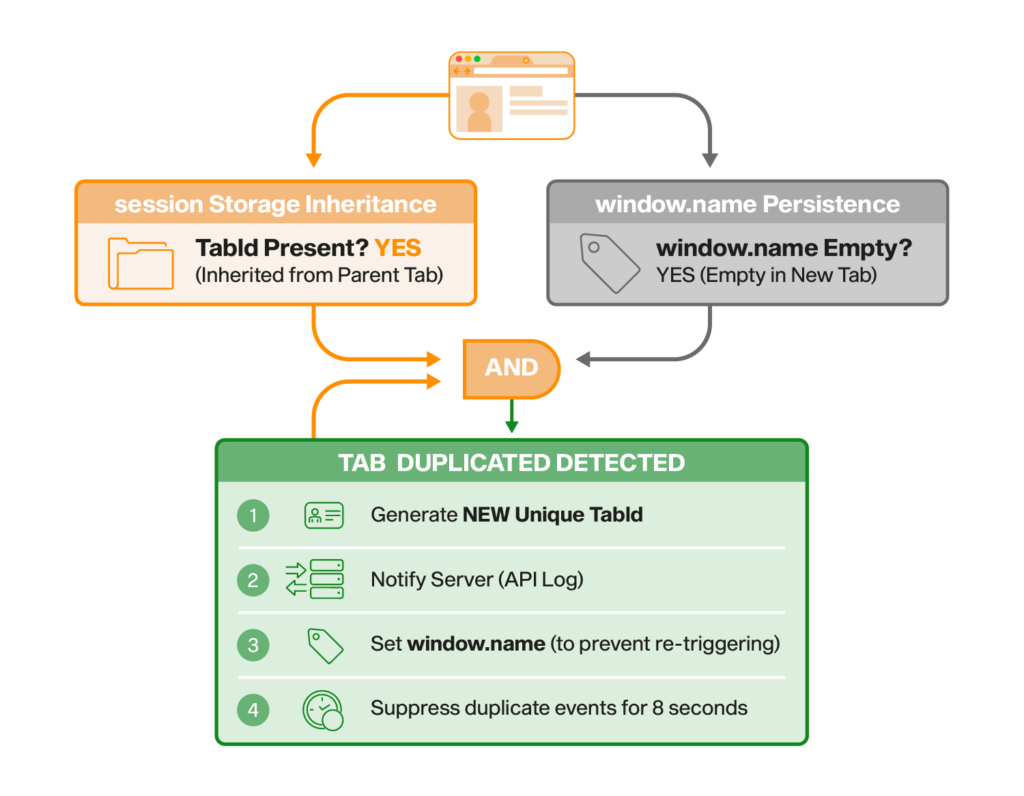
Figure 1 – In MyBTD, the TABDetection Web Block provides this protection in commonly used Chromium-based browsers, such as Google Chrome and Microsoft Edge. Firefox may have some limitations due to its handling of sessionStorage.
4. Mitigation Strategies
Detection alone does not prevent the problem. It is also necessary to define what should happen when a duplicated tab is identified.
Option A – Block the Duplicated Tab
Recommended for critical processes.
The new tab is immediately redirected to an error page, while the original tab continues to operate normally.
This approach is particularly suitable for checkout processes, payments or important submissions. For example, if a customer duplicates the tab during payment, only the original tab will be able to complete the order, preventing duplicate charges.
The message displayed should be simple and clear:
This operation is already open in another tab. Please continue in that tab.
Option B – Synchronisation Using BroadcastChannel
Suitable for dashboards and read-only screens.
Not every scenario requires the duplicated tab to be blocked. On screens that are primarily informational, keeping the data synchronised may be sufficient.
The BroadcastChannel API allows multiple tabs from the same origin to communicate with each other in real time. When one tab receives or changes information, it can notify the other tabs so that they can update their data.
On a stock dashboard, for example, an update received in one tab can be communicated to the others, preventing decisions from being made based on outdated information.
Option C – localStorage as the Single Source of Truth
Suitable for simple states shared between tabs.
Unlike sessionStorage, localStorage is shared by all tabs from the same origin. It can therefore be used to store a shared state, together with a mechanism that determines which tab is allowed to modify it.
In a shopping basket, for example, a change made in one tab can be detected by the others. They can then display a message and reload the most recent state.
This option is simple and avoids additional server requests, although care must be taken to prevent simultaneous changes.
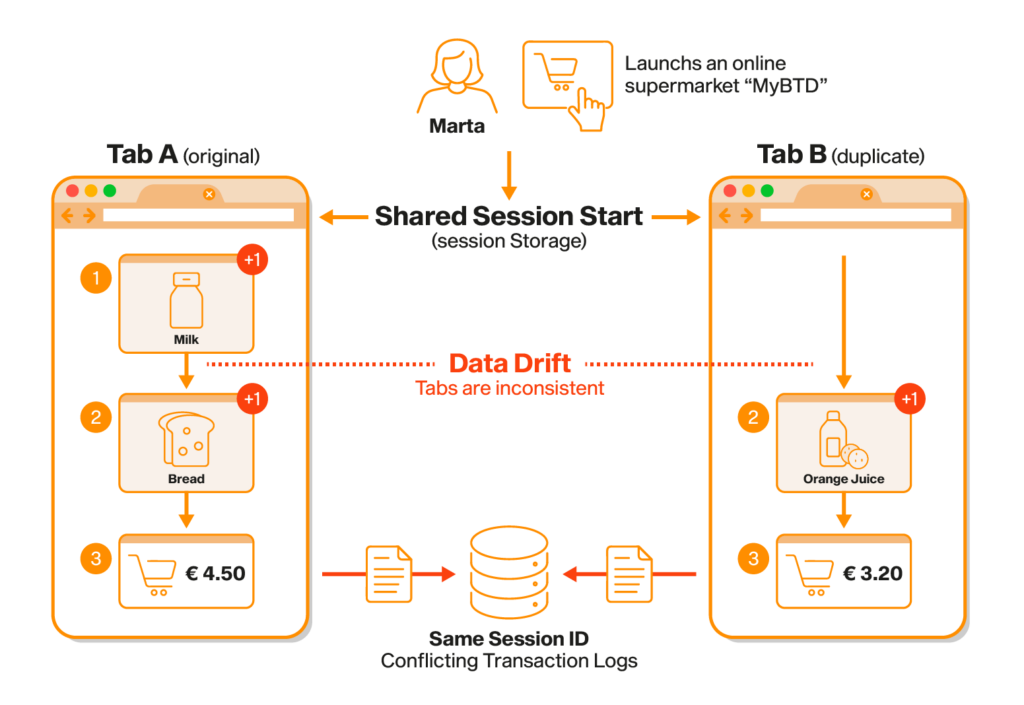
Figure 2 – Effective for lightweight state synchronisation without round trips to the server.
Option D – Server-Side TabId Validation
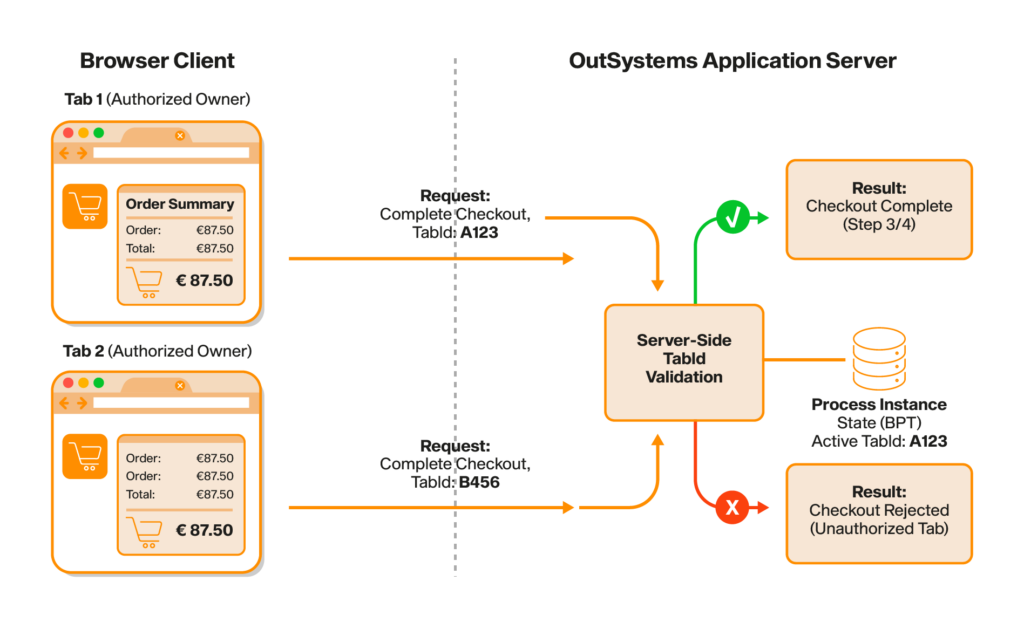
Figure 3 – The most robust solution for critical, regulated or audited processes.
Browser-side controls can be bypassed. To ensure process integrity, validation must also be performed on the server.
The TabId is sent with every relevant request, and the server confirms whether the tab is the authorised owner of the process instance. Requests sent by other tabs are rejected.
In OutSystems, the identifier can be stored in a session variable or in a process attribute and validated during actions such as:
- Starting BPT processes.
- Submitting forms.
- Approving process stages.
- Saving data.
- Creating customer orders or purchase orders.
This option adds complexity, but provides the highest level of protection.
5. Comparison of the Strategies
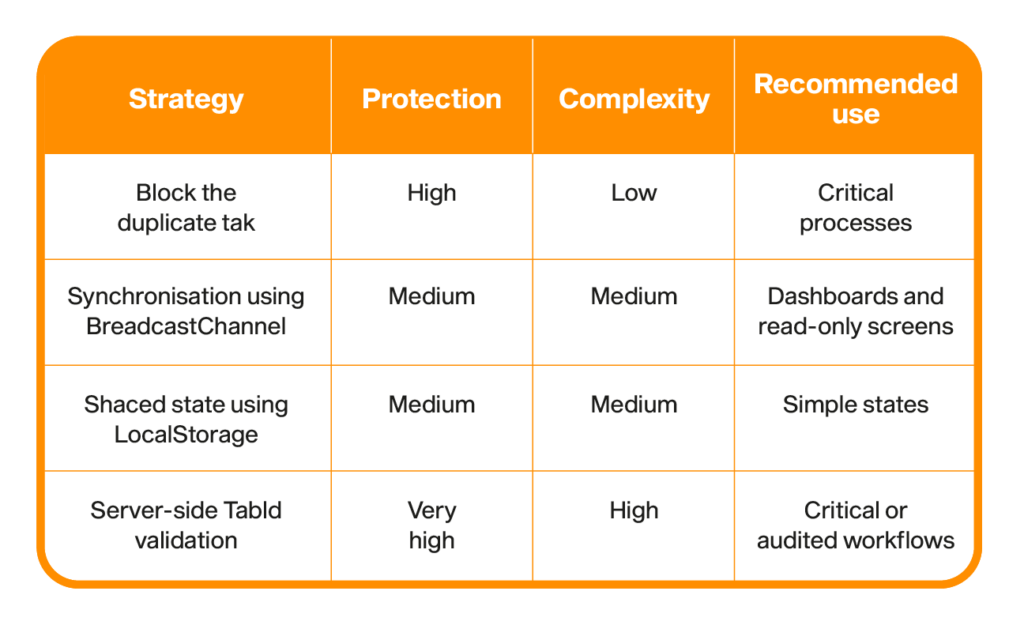
Table 1 – Comparison of duplicate-tab mitigation strategies.
6. Recommendation
For a transactional application such as MyBTD, a combination of Options A and D is recommended.
The TABDetection Web Block can quickly block duplicated tabs on screens that start or advance processes. At the same time, server-side TabId validation should protect the most critical actions, such as starting BPT processes, submitting processes and saving data.
This approach creates multiple layers of protection:
- The client responds quickly to the most common situations.
- The server ensures process integrity.
- Each mechanism operates independently.
7. Conclusion
Tab duplication may appear to be harmless behaviour, but in stateful applications involving transactional processes, it can result in duplicate orders, inconsistent information or workflows being executed twice.
The best approach is to detect tab duplication on the relevant screens, block the new tab when the risk is high and implement server-side validations for the most critical operations.
Users who never duplicate a tab will not notice any difference. Those who do will receive a clear message instead of silently causing a situation that is difficult to reproduce and resolve.
Henrique S.
OutSystems Tech Lead at Babel